The painter His robot-painting code from the RobotArt years, 2017–18: a painting library in C++ and the code that drove the robot
- Recreation, 2026, of his own bot simulator, replaying the real plan his code made
- 2017–18
- C++ with OpenCV (the painter library) and Python (the robot)
- 7,850 lines in his painter library; 20,268 in the repository; 2,898 in the robot code
RobotArt was the robot-painting contest he funded, and he wrote code for it too. This is his demo for the contest’s painting robot: turn a picture into lines, dip the brush, paint each line, and lift between them. The plan below is exactly what his program sends to the robot: 2,695 moves and 13 brush strokes, recorded by running his 2018 code unchanged. It plays back in his own simulator, rebuilt for the browser line by line: the robot from above and from the side on the left, the canvas on the right.
Watch a 35-second recording instead
An arm painting the same pig, 2018
panda_painter_demo.gif, October 2018): a seven-axis Franka Emika Panda arm in the ROS robot simulator, tracing the pig. The Panda connection was written by D. J. Kelleher, one of his collaborators on the painter code. Converted from GIF to video; nothing else changed.The painter library
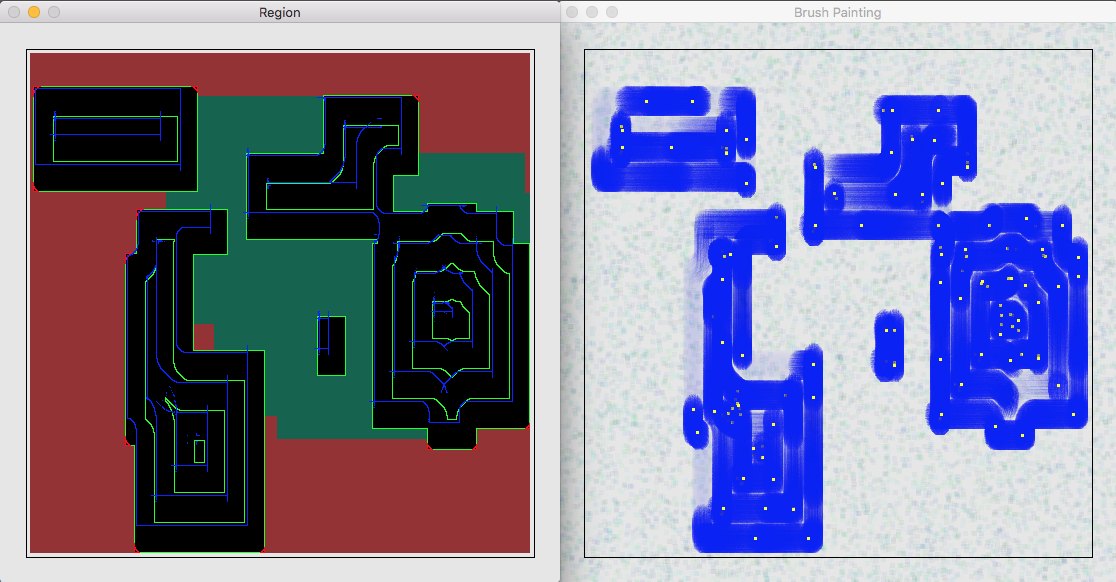
How it plans strokes: the library reduces a photo to a few paint colours (k-means) and splits it into regions. For each region it slides a model of the brush along the region’s edge, trying several orientations, and keeps the placements that cover pixels of that colour without touching pixels that must stay another colour. Then it links those placements into strokes and works inward. With a webcam it photographs the canvas, compares it with the target, and picks the colour and strokes that fix the biggest error next.
How it drives the robot: each stroke becomes simple machine commands: G1 X… Y… Z… moves, a paint colour, and a pause. They go over a network socket to a small “bot server”, which passes them to the robot’s controller. The same code could drive the RobotArt gantry robot or, through ROS, a Franka Panda arm. Older parts of the library wrote programs for ABB and ST Robotics arms.
What’s original and what’s new: the plan is his. It was recorded by running bot_demo.py from his RobotArt repository (last commit October 24, 2018) on its own sample picture. The only shims: windows were switched off, OpenCV’s newer findContours was given its 2018 return format, and commands were recorded instead of sent. The simulator on this page is new, a 2026 JavaScript port of his doSimulateBot and doSimulateDraw, with his dimensions, colours and timing. One quirk carries over from his code: the demo asks for brush heights above the floor, but his simulator only accepts heights at or below its home position. So in the side view the brush never rises.
Collaborators, from the commit history: D. J. Kelleher (the Panda arm connection), Milan Erdelj (the Qt app) and Qin Yongliang, “ctmakro” (the robot’s serial control). Andrew made 67 of the painter repository’s 98 commits and 16 of RobotArt’s 25. Line counts include comments and blank lines and leave out bundled third-party files (pugixml, get-pip, CImg).